


REVIEW ARTICLE

DATA ANALYSIS IN QUALITATIVE RESEARCH: A BRIEF GUIDE TO USING NVIVO
Figure 6. Document attribute explorer (click image to enlarge)

Search operation
The three most useful types of searches in NVivo are Single item (text, node, or attribute value), Boolean and Proximity searches. Single item search is particularly important, for example, if researchers want to ensure that every mention of the word ‘cure’ has been coded under the ‘Curability of cervical cancer’ tree node. Every paragraph in which this word is used can be viewed. The results of the search can also be compiled into a single document in the node browser and by viewing the coding stripe. The researcher can check whether each of the resulting passages has been coded under a particular node. This is particularly useful for the researcher to further determine whether conducting further coding is necessary.
Boolean searches combine codes using the logical terms like ‘and’, ‘or’ and ‘not’. Common Boolean searches are ‘or’ (also referred to as ‘combination’ or ‘union’) and ‘and’ (also called 'intersection'). For example, the researcher may wish to search for a node and an attributed value, such as ‘ever screened for cervical cancer’ and ‘primary educated’. Search results can be displayed in matrix form and it is possible for the researcher to perform quantitative interpretations or simple counts to provide useful summaries of some aspects of the analysis.13 Proximity searches are used to find places where two items (e.g. text patterns, attribute values, nodes) appear near each other in the text.
Using models to show relationships
Models or visualisations are an essential way to describe and explore relationships in qualitative research. NVivo provides a Modeler designated for visual exploration and explanation of relationships between various nodes and documents. In Model Explorer, the researcher can create, label and connect ideas or concepts. NVivo allows the user to create a model over time and have any number of layers to track the progress of theory development to enable the researcher to examine the stages in the model-building over time (Figure 7). Any documents, nodes or attributes can be placed in a model and clicking on the item will enable the researcher to inspect its properties.
Figure 7. Model explorer showing the perceived risk factors of cervical cancer (click image to enlarge)
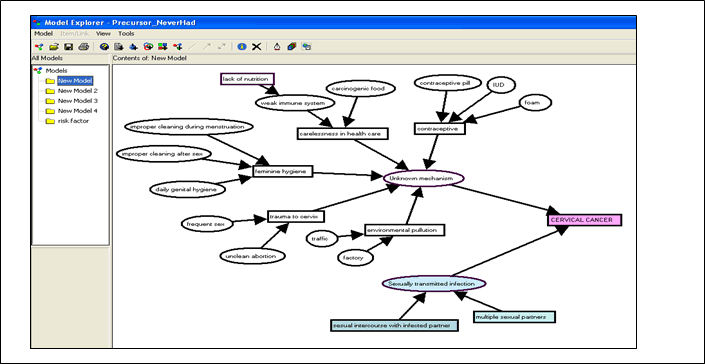
Note: A model showing the relationships of the perceived risk factors of cervical cancer as related by the respondents. The mechanisms through which the respondents thought they might obtain an infection are divided into two categories; sexual transmitted infection and unknown mechanism. The respondents considered feminine hygiene, trauma to the cervix, carelessness in health care and the use contraceptives could lead to infection and subsequently causes cervical cancer via a mechanism unknown to them.
SUMMARY
NVivo has clear advantages and can greatly enhance research quality as outlined above. It can ease the laborious task of data analysis which would otherwise be performed manually. The software certainly removes the tremendous amount of manual tasks and allows more time for the researcher to explore trends, identify themes, and make conclusions. Ultimately, analysis of qualitative data is now more systematic and much easier. In addition, NVivo is ideal for researchers working in a team as the software has a Merge tool that enables researchers that work in separate teams to bring their work together into one project.
The NVivo software has been revolutionised and enhanced recently. The newly released NVivo 7 (released March 2006) and NVivo 8 (released March 2008) are even more sophisticated, flexible, and enable more fluid analysis. These new softwares come with a more user-friendly interface that resembles the Microsoft Windows XP applications. Furthermore, they have new data handling capacities such as to enable tables or images embedded in rich text files to be imported and coded as well. In addition, the user can also import and work on rich text files in character based languages such as Chinese or Arabic.
To sum up, qualitative research undoubtedly has been advanced greatly by the development of CAQDAS. The use of qualitative methods in medical and health care research is postulated to grow exponentially in years to come with the further development of CAQDAS.
More information about the NVivo software
Detailed information about NVivo’s functionality is available at http://www.qsrinternational.com. The website also carries information about the latest versions of NVivo. Free demonstrations and tutorials are available for download.
ACKNOWLEDGEMENT
The examples in this paper were adapted from the data of the study funded by the Ministry of Science, Technology and Environment, Malaysia under the Intensification of Research in Priority Areas (IRPA) 06-02-1032 PR0024/09-06.
TERMINOLOGY
Attributes: An attribute is a property of a node, case or document. It is equivalent to a variable in quantitative analysis. An attribute (e.g. ethnicity) may have several values (e.g. Malay, Chinese, Indian, etc.). Any particular node, case or document may be assigned one value for each attribute. Similarities within or differences between groups can be identified using attributes. Attribute Explorer displays a table of all attributes assigned to a document, node or set.
CAQDAS: Computer Aided Qualitative Data Analysis. The CAQDAS programme assists data management and supports coding processes. The software does not really analyse data, but rather supports the qualitative analysis process. NVivo is one of the CAQDAS programmes; others include NUDIST, ATLAS-ti, AQUAD, ETHNOGRAPH and MAXQDA.
Code: A term that represents an idea, theme, theory, dimension, characteristic, etc., of the data.
Coder: A tool used to code a passage of text in a document under a particular node. The coder can be accessed from the Document or Node Browser.
Coding: The action of identifying a passage of text in a document that exemplifies ideas or concepts and connecting it to a node that represents that idea or concept. Multiple codes can be assigned to the same segment of text in a document.
Coding stripes: Coloured vertical lines displayed at the right-hand pane of a Document; each is named with title of the node at which the text is coded.
DataLinks: A tool for linking the information in a document or node to the information outside the project, or between project documents. DocLinks, NodeLinks and DataBite Links are all forms of DataLink.Document: A document in an NVivo project is an editable rich text or plain text file. It may be a transcription of project data or it may be a summary of such data or memos, notes or passages written by the researcher. The text in a document can be coded, may be given values of document attributes and may be linked (via DataLinks) to other related documents, annotations, or external computer files. The Document Explorer shows the list of all project documents.
Memo: A document containing the researcher's commentary flagged (linked) on any text in a Document or Node. Any files (text, audio or video, or picture data) can be linked via MemoLink.
Model: NVivo models are made up of symbols, usually representing items in the project, which are joined by lines or arrows, designed to represent the relationship between key elements in a field of study. Models are constructed in the Modeller.
Node: Relevant passages in the project's documents are coded at nodes. A Node represents a code, theme, or idea about the data in a project. Nodes can be kept as Free Nodes (without organisation) or may be organised hierarchically in Trees (of categories and subcategories). Free nodes are free-standing and are not associated to themes or concepts. Early on in the project, tentative ideas may be stored in the Free Nodes area. Free nodes can be kept in a simple list and can be moved to a logical place in the Tree Node when higher levels of categories are discovered. Nodes can be given values of attributes according to the features of what they represent, and can be grouped in sets. Nodes can be organised (created, edited) in Node Explorer (a window listing all the project nodes and node sets). The Node Browser displays the node’s coding and allow the researcher to change the coding.
Project: Collection of all the files, documents, codes, nodes, attributes, etc. associated with a research project. The Project pad is a window in NVivo when a project is open which gives access to all the main functions of the programme.
Sets: Sets in NVivo hold shortcuts to any nodes or documents, as a way of holding those items together without actually combining them. Sets are used primarily as a way of indicating items that in some way are related conceptually or theoretically. It provides different ways of sorting and managing data.
Tree Node: Nodes organised hierarchically into trees to catalogue categories and subcategories.
References
- Mays N, Pope C. Qualitative research in health care. Assessing quality in qualitative research. BMJ.2000;320(7226):50-2 [PubMed] [Full text]
- Harding G, Gantley M. Qualitative methods: beyond the cookbook. Fam Pract. 1998;15(1):76-9 [PubMed] [Full text]
- Pope C, Mays N. Qualitative Methods in Health and Health Services Research. In: Mays N, Pope N (eds). Qualitative research in health care. London: BMJ; 1996.
- Holloway I, editor. Qualitative Research In Health Care. Maidenhead, England: Open University Press, 2005.
- Basit TN. Manual or electronic? The role of coding in qualitative data analysis. Educational Research. 2003;45(2):143-54 [Full text]
- Tashakkori A, Teddlie C, editors. Handbook of Mixed Methods in Social and Behavioral Research. Thousand Oaks, California: Sage; 2003.
- Bogdan RC, Biklen SK. Qualitative Research for Education: An Introduction to Theory and Methods. Boston: Allyn and Bacon; 1982.
- Patton MQ. Qualitative Research & Evaluation Methods. 3rd edition. Thousand Oaks, Californa: Sage; 2002.
- Dey I. Qualitative Data Analysis: A User-Friendly Guide for Social Scientists. London: Routledge; 1993.
- Roberts KA, Wilson RW. ICT and the research process: issues around the compatibility of technology with qualitative data analysis. Forum Qualitative Sozialforschung. 2002;3(2). Available at: URL here. [Full text]
- Wickham M, Woods M. Reflecting on the strategic use of CAQDAS to manage and report on the qualitative research process. The Qualitative Report. 2005;10(4): 687-702 [Full text]
- Richards L. Using Nvivo in Qualitative Research. London: Sage; 1999.
- Pope C, Ziebland S, Mays N. Qualitative research in health care. Analysing qualitative data. BMJ. 2000;320(7227):114-6 [PubMed] [Full text]